Have you published several articles but still receive very few visitors? You’re not alone. Many new website owners face this challenge. Publishing content is only the beginning of a successful online journey.
Website SEO helps improve your website’s visibility in search engines. Moreover, it includes keyword research, content optimization, technical improvements, and link building. As a result, these activities help search engines better understand your pages and connect them with relevant searches. Additionally, effective SEO makes it easier for users to discover useful content. Therefore, optimizing your website can help attract more visitors and increase organic traffic over time.
However, you don’t need expensive software to get started. Instead, you can use free tools like Google Search Console and PageSpeed Insights to identify website issues. Additionally, these tools provide useful insights to help you improve your website’s performance. Therefore, by following a clear strategy and making regular improvements, you can gradually strengthen your website’s SEO and attract more organic traffic.
In this guide, you’ll discover ten practical methods to improve your website. You’ll also learn which tools to use and how to measure your progress.
What Is Website SEO?
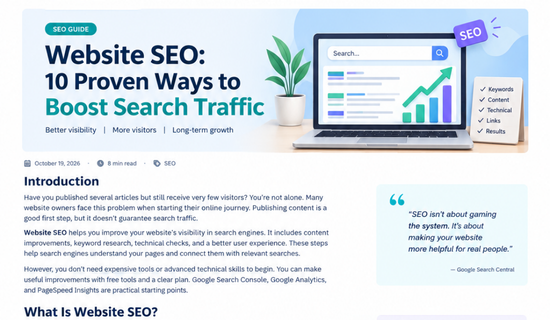
Website SEO means improving your website so search engines can discover, understand, and display its pages to relevant users. It also helps visitors find useful information easily.
For example, someone searching for an AI logo generator wants a suitable tool. A page with clear instructions, helpful examples, and relevant recommendations may match that search better.
SEO includes three main areas.
- On-page SEO: Improve titles, headings, images, content, and internal links.
- Technical SEO: Help search engines crawl, access, and index your pages.
- Off-page SEO: Build your website’s reputation through relevant mentions and genuine backlinks.
Each area supports your wider search strategy. However, your priorities should depend on your website’s current needs.
Why Is Website SEO Important?
Search engines can introduce your content to people who are already looking for answers. As a result, organic traffic becomes valuable for blogs, online stores, and service websites. Additionally, these visitors may be more interested in your content because it matches their search intent. Therefore, improving your website’s SEO can help you reach the right audience and attract potential customers naturally.
Paid advertising can attract visitors quickly. However, traffic may decrease when advertising campaigns stop. Organic search can continue bringing visitors when your pages remain useful and competitive.
SEO also helps you understand your audience. Search queries reveal common questions, product interests, and information gaps.
For example, an AI website might attract readers searching for free design tools. Publishing detailed guides about these tools can help attract a relevant audience.
Remember, SEO doesn’t guarantee first-page rankings. Instead, it provides a practical way to improve your website’s visibility over time.
1. Find the Right Keywords Before Writing
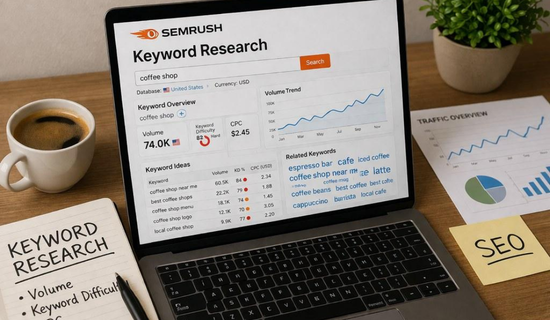
Keyword research helps you discover the phrases people use when searching online. It also helps you select topics that match your website’s purpose.
A broad keyword such as “AI tools” covers many different needs. A specific phrase like “free AI logo generator for beginners” provides a clearer topic.
However, search volume isn’t the only factor to consider. You should also examine competition, search intent, and the usefulness of your content.
Best Free Keyword Research Tools
- Google Keyword Planner: Discover keyword ideas and estimated search demand.
- Google Trends: Compare interest in different topics.
- Google Search Console: Find queries already bringing impressions to your pages.
- Google auto complete: Explore related searches and common questions.
You can also use Ubersuggest to explore keyword ideas and competition estimates. Keep in mind that third-party metrics are estimates.
Example Keyword Research Table
| Keyword | Search intent | Content idea |
|---|---|---|
| AI logo generator | Find a tool | Tool comparison |
| Free AI writing tools | Compare options | Beginner’s guide |
| Website SEO checklist | Learn and apply | Step-by-step tutorial |
| How to fix slow websites | Solve a problem | Troubleshooting guide |
Choose one primary keyword for each article. Then include related phrases naturally where they improve the explanation.
2. Create Helpful Content That Answers Real Questions
Good content gives readers a reason to stay, learn, and return. It should answer their main questions without unnecessary paragraphs.
Many bloggers focus too heavily on article length. However, a longer article isn’t automatically better than a shorter, useful one.
Google’s guidance encourages helpful, reliable content created for people. Therefore, include practical steps, original examples, accurate information, and clear explanations.
For example, imagine a small business owner searching for website design advice. However, a page containing only general statements may not provide enough useful information. Instead, a detailed guide explaining design choices, common mistakes, and practical examples can offer greater value. Moreover, it helps readers understand the topic more clearly and make better decisions. As a result, helpful content can improve the user experience and encourage visitors to explore more pages.
What Should a Helpful Article Include?
- A clear introduction explaining the reader’s problem.
- Descriptive headings that organize information.
- Simple explanations supported by examples.
- Original images or screenshots when useful.
- A conclusion that summarizes the main advice.
Before publishing, check your facts and remove repeated ideas. Also, make sure every section serves a clear purpose.
3. Optimize Titles, Headings, and Meta Descriptions
Your page title helps search engines understand the subject. It also gives potential visitors an idea of what they’ll find.
Include your primary keyword when it fits naturally. Keep the title accurate and avoid repeating the same phrase unnecessarily.
For example, “Website SEO Checklist for Beginners” clearly describes a practical guide. A vague title like “Everything You Need to Know” provides less information.
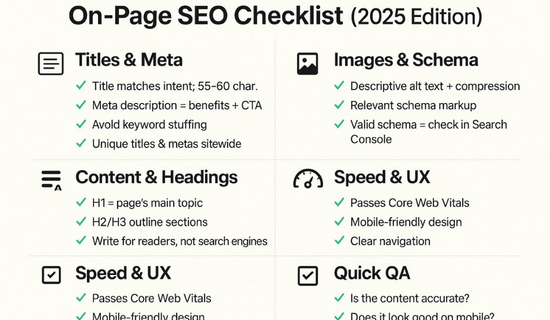
On-Page SEO Checklist
- Write a unique title for every important page.
- Create a useful meta description.
- Use descriptive headings and logical sections.
- Add meaningful alt text to informative images.
- Link to related articles on your website.
Meta descriptions can help searchers understand your content. However, Google may display a different snippet depending on the search query.
Avoid keyword stuffing. Natural writing is easier to understand and provides a better reading experience.
4. Improve Website Speed and Mobile Experience
Visitors expect pages to load smoothly and work well on their devices. A slow or confusing website can make useful content harder to access.
Google PageSpeed Insights helps you assess page performance and identify potential improvements. It provides lab data and, when available, real-user performance data.
Start with the issues affecting your most important pages. You don’t need to fix everything at once.
Technical Problems and Their Solutions
| Problem | Suggested solution |
|---|---|
| Large image files | Compress images and use suitable formats |
| Broken links | Repair incorrect URLs |
| Poor mobile layout | Test different screen sizes |
| Missing page titles | Add unique, descriptive titles |
| Indexing issues | Inspect affected URLs in Search Console |
You should also review Core Web Vitals.
| Metric | Good threshold |
|---|---|
| Largest Contentful Paint (LCP) | 2.5 seconds or less |
| Interaction to Next Paint (INP) | 200 milliseconds or less |
| Cumulative Layout Shift (CLS) | 0.1 or less |
These thresholds are assessed at the 75th percentile of page visits. Good scores support a better user experience, but they don’t guarantee higher rankings.
5. Make Your Website Mobile-Friendly
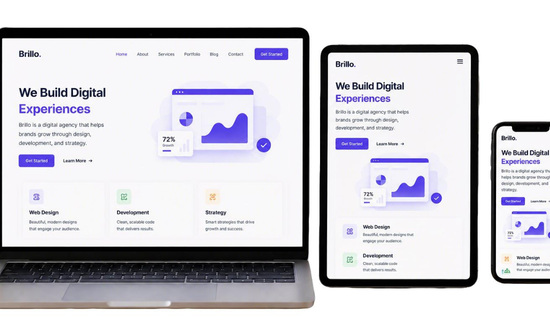
Many people browse websites using smartphones. Therefore, your content should remain easy to read on smaller screens.
Use a responsive theme and readable font sizes. Avoid layouts that force visitors to zoom or scroll horizontally.
Check that buttons, navigation menus, and forms work correctly. Also, make sure important information isn’t hidden behind unnecessary pop-ups.
If you use WordPress, preview your pages on mobile before publishing. A simple, readable design often works better than a page crowded with decorative elements.
6. Use Internal Links and Earn Relevant Backlinks
Internal links connect related pages on your website. They help readers discover additional information and help search engines understand how your content connects.
For example, an article about AI writing tools could link to your guide about AI content creation. Readers can explore related topics without searching again.
Use descriptive anchor text instead of vague phrases like “click here.”
Backlinks are links from other websites to your pages. Relevant backlinks can help people discover your content and may support your site’s reputation.
Ways to Earn Relevant Backlinks
- Publish original tutorials and useful resources.
- Create detailed comparisons and practical guides.
- Contribute relevant guest articles to suitable websites.
- Build relationships with creators in your industry.
- Share useful resources with relevant communities.
Avoid buying spam my links or joining link schemes. Focus on creating content that other website owners genuinely want to reference.
7. Optimize Images for Search Engines
Images can make articles more engaging and easier to understand. However, large files may slow down your website.
Use descriptive file names before uploading images. Add alt text when an image communicates useful information.
For example, ai-logo-generator-tools.png describes an image more clearly than IMG001.png.
Image Optimization Checklist
- Compress images before uploading.
- Use WebP or another suitable image format.
- Write descriptive file names.
- Add accurate alt text.
- Include captions when they provide useful context.
Don’t add keywords to every image unnecessarily. Alt text should describe the actual image and its purpose.

8. Track Results With Google Search Console
You can’t improve your website effectively without understanding its performance. Google Search Console provides useful information about how your pages appear in Google Search.
You can monitor clicks, impressions, click-through rates, and average positions. You can also investigate indexing issues and discover search queries.
Google Analytics provides additional information about visits and user activity. Together, these tools help you make informed decisions.
A Simple Monthly SEO Routine
- Review your best-performing pages.
- Find queries receiving impressions but few clicks.
- Improve titles where appropriate.
- Inspect important pages with indexing problems.
- Update outdated information.
- Compare results with previous periods.
Don’t expect every improvement to produce immediate results. Search performance changes can take time, depending on the website and the work completed.
9. Update Existing Articles Regularly
Publishing new articles is useful, but existing content also deserves attention. Some pages may contain outdated facts, broken links, or missing information.
Review older articles and identify areas that need improvement. Add relevant examples, update statistics, and remove information that no longer applies.
However, don’t change dates simply to make old articles appear new. Make meaningful improvements before updating publication or modification dates.
You should also avoid rewriting successful pages without a clear reason. Compare their search performance before making major changes.
10. Follow Useful SEO Developments
Search engines continue to improve how they understand content and present search results. Website owners should follow official guidance instead of relying on every online prediction.
AI tools can help with brainstorming, outlining, editing, and research. However, review their output carefully and verify important claims.
Your content should provide accurate information, clear explanations, and genuine value. Avoid publishing large numbers of repetitive pages simply to target more keywords.
Focus on your audience’s needs. Create articles that answer real questions and make supporting resources easy to find.
Common Website SEO Mistakes to Avoid
Even useful websites can struggle when important SEO basics are overlooked. Fortunately, many common problems are easy to identify.
Watch out for these mistakes:
- Publishing articles without researching search intent.
- Repeating keywords unnaturally throughout the content.
- Ignoring broken links and indexing problems.
- Using large images without compression.
- Creating similar articles that compete for the same search.
- Buying low-quality backlinks to manipulate rankings.
Instead, build a clear content plan and review your website regularly. Prioritize changes that help visitors and make your pages easier to understand.
Conclusion
Growing organic traffic takes planning, patience, and consistent improvements. Start with keyword research and useful content. Then improve titles, internal links, mobile usability, and technical performance.
A successful website SEO strategy doesn’t depend on one trick or expensive tool. It combines relevant information, accessible pages, and careful performance tracking.
Use Google Search Console to measure progress and identify new opportunities. Update articles when necessary, and avoid publishing content simply to fill your website.
Most importantly, keep your readers’ needs at the center of every decision. Meaningful improvements can create a stronger foundation for long-term organic growth.
Frequently Asked Questions
1. What is website SEO?
Website SEO involves improving content, page structure, and technical settings. These improvements help search engines understand your pages and connect them with relevant searches.
2. How long does SEO take to show results?
Results vary depending on competition, website history, and the changes you make. Some improvements may appear within days, while others take several months.
3. Can I do SEO for free?
Yes. Google Search Console, Google Trends, Google Analytics, and PageSpeed Insights offer useful free features.
4. Is SEO important for a new website?
Yes. SEO helps new websites develop a clear structure, publish relevant content, and identify technical problems. However, rankings aren’t guaranteed.
5. Does AI-generated content affect SEO?
AI-generated content isn’t automatically excluded from search results. Focus on accuracy, originality, usefulness, and the value provided to readers.
6. How can I check my website’s SEO?
Use Google Search Console to monitor clicks, impressions, queries, and average positions. Use PageSpeed Insights to investigate page performance.