Getting traffic from Google can feel difficult when your website is new. You publish useful articles, choose keywords, and wait for visitors. However, traffic may remain low when your website has hidden SEO problems.
A website seo optimization checker helps you identify issues affecting your website’s search performance. It reviews important elements, including page titles, meta descriptions, links, and technical settings. Some tools also check page speed, mobile performance, and indexing problems.
The good news is that you don’t need expensive software to start improving your website. Several free tools can help you understand what’s working and what needs attention. Google Search Console, PageSpeed Insights, and free SEO audit tools offer useful starting points.
Search Console Help
+2
Still, running a scan is only the first step. Therefore, you must understand the results and fix the most important problems first. In this guide, you’ll learn how to choose a checker, review your website, and improve your SEO step by step.
What Is a Website SEO Checker?
An SEO checker is a tool that examines different parts of your website. Moreover, it identifies errors that may affect crawling, indexing, user experience, and search visibility. As a result, you can find problems and improve your website’s SEO performance.
For example, a checker might find a missing title tag or a broken internal link. It could also highlight oversized images or pages with slow loading times. These findings help you understand where your website needs improvement.
Different tools provide different levels of analysis. Some examine one page, while others crawl hundreds of URLs. Advanced platforms can also analyze backlinks, keyword rankings, and website health.
According to Google Search Central, creating helpful, reliable, people-focused content remains an important part of SEO. Technical checks support that goal, but they cannot replace useful information.
Search Console Help
+1
“A useful SEO report should explain the problem, its impact, and the next step.”
That’s the main purpose of an audit. It should help you make better decisions rather than simply give your website a score.
Why Do You Need an SEO Checker?
Your website may look perfect; however, search engines might encounter technical problems. For example, a page might have a poor title, confusing headings, or an incorrect indexing setting.
These issues can make it harder for search engines to understand and display your content. They can also create a frustrating experience for visitors.
Using an SEO analysis tool regularly helps you discover problems before they affect more pages. It also makes your optimization process easier to manage.
Here are some common benefits:
- Find technical errors: Discover broken links, crawl issues, and incorrect indexing settings.
- Improve on-page SEO: Review titles, descriptions, headings, and image alt text.
- Check page speed: Identify performance problems on desktop and mobile devices.
- Understand website health: Organize errors and improvement opportunities.
- Support content planning: Find pages that need updates or better internal links.
However, don’t assume every warning needs immediate attention. Some issues have little impact, while others can prevent important pages from appearing in search results.
Best Website SEO Checker Tools in 2026
Choosing the right tool depends on your website’s size, budget, and goals. Beginners can start with free options before paying for advanced features.
Here are five useful tools for different SEO tasks.
1. Google Search Console
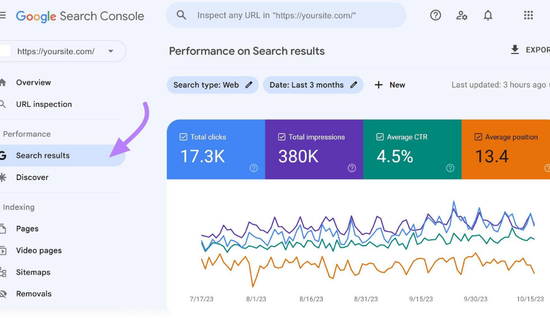
Google Search Console is a free service for website owners. Additionally, it shows how your pages perform in Google Search and helps identify indexing issues.
You can use it to:
- Check clicks, impressions, and average search position.
- Discover queries that bring visitors to your website.
- Inspect individual URLs and their indexing status.
- Review available reports for crawling and search performance.
It’s especially useful for new websites that need reliable performance data. However, it doesn’t replace every technical audit or backlink analysis tool.
Search Console Help
2. Google PageSpeed Insights
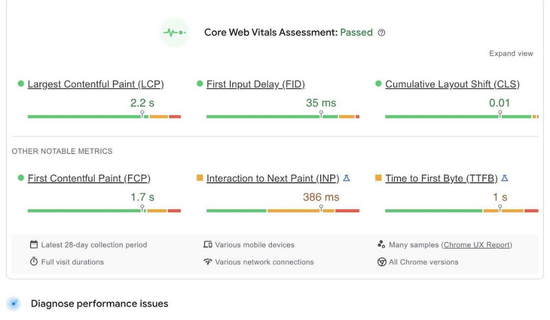
Google PageSpeed Insights tool checking website speed and performance on desktop and mobile
Google PageSpeed Insights checks webpage performance on desktop and mobile. Additionally, it provides diagnostics and performance recommendations to help you improve your website’s speed.
Its reports include metrics such as Largest Contentful Paint (LCP), Interaction to Next Paint (INP), and Cumulative Layout Shift (CLS). These help you understand loading speed, responsiveness, and visual stability.
The tool also separates simulated laboratory results from available real-user data. That distinction matters because a single test doesn’t represent every visitor’s experience.
Google for Developers
3. Semrush SEO Checker
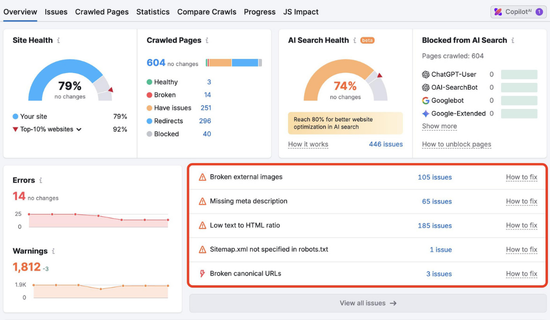
Semrush offers an SEO checker that identifies technical and on-page issues. It provides an overall health score and recommendations for fixing problems.
You can review metadata, mobile usability, page speed, and other optimization areas. Its broader audit features can help when you need to examine an entire website.
The free checker is useful for an initial review. More advanced monitoring and auditing features may require a paid plan.
Semrush
+1
4. Ahrefs Webmaster Tools
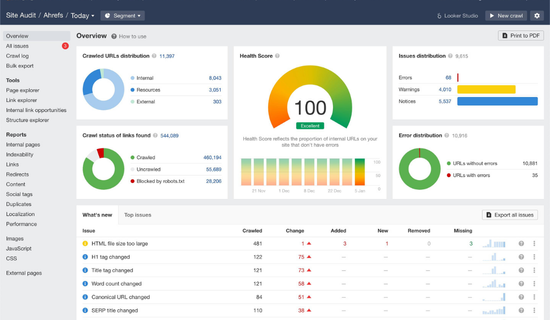
Ahrefs provides free website analysis features for verified website owners. Its tools can identify technical errors, review backlinks, and reveal organic keyword data.
This option is helpful when you want to understand both website health and external links. You need to verify ownership to access its website-specific free features.
Ahrefs
5. Screaming Frog SEO Spider
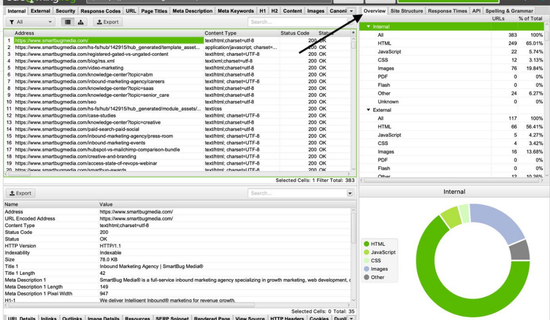
Screaming Frog SEO Spider crawls website URLs and collects detailed technical information. It can help identify broken links, redirect issues, missing metadata, and duplicate page elements.
Its free version is useful for smaller audits, while larger projects may require a paid licence. It’s a strong option for users who want detailed crawl reports rather than a simple score.
Zapier
+1
Comparison of the Best SEO Checker Tools
The following table summarizes the main uses of these tools. Features and free-tier limits may change, so check each provider’s current terms.
| Tool | Best For | Cost |
|---|---|---|
| Google Search Console | Search performance and indexing | Free |
| PageSpeed Insights | Speed and Core Web Vitals | Free |
| Semrush | On-page and technical audits | Free checker; paid plans |
| Ahrefs Webmaster Tools | Verified-site audits and backlinks | Free features |
| Screaming Frog | Technical website crawling | Free limited version |
There isn’t one perfect tool for every website. Instead, combine tools when necessary to cover your main SEO needs.
For example, Search Console can show indexing problems, while PageSpeed Insights can reveal performance issues. A crawler can then help you find broken links across many pages.
What Does a Website SEO Optimization Audit Check?
A website seo optimization checker can examine several areas, depending on its features. Understanding these areas helps you interpret your report correctly.
1. On-Page SEO
On-page SEO covers the elements you control within a webpage. These elements help search engines understand the topic and structure of your content.
Check the following:
- Page titles that describe the content accurately.
- Meta descriptions that explain why the page is useful.
- A clear H1 heading and logical H2 or H3 sections.
- Relevant keywords used naturally throughout the article.
- Descriptive image alt text and helpful internal links.
Avoid repeating the same keyword in every heading. Write for readers first, then make the topic clear to search engines.
2. Technical SEO
Technical SEO helps search engines access and understand your website. A page can contain excellent content but remain invisible if important indexing settings are incorrect.
Review these areas:
- HTTPS security and correct page URLs.
- XML sitemap availability and accuracy.
- Robots.txt rules and noindex directives.
- Canonical tags and redirect behavior.
- Broken links and server response errors.
Not every warning represents a serious problem. First, determine whether important pages can be crawled and indexed.
3. Website Speed and Mobile Experience
Visitors expect pages to load smoothly on different devices. Slow pages can frustrate users, especially when they browse through mobile connections.
Use PageSpeed Insights to check available performance data. Review large images, unnecessary scripts, caching, and other reported bottlenecks.
Google’s Core Web Vitals include three important measures:
| Metric | What It Measures | Good Target |
|---|---|---|
| LCP | Loading performance | 2.5 seconds or less |
| INP | Interaction responsiveness | 200 milliseconds or less |
| CLS | Unexpected layout movement | 0.1 or less |
These targets apply to the 75th percentile of page visits. Field data, when available, provides a better picture of real-user experience than one laboratory test.
Google for Developers
“A fast website should feel easy to use, not just look good in a report.”
So, test important pages on your phone as well as your computer. Check menus, buttons, text size, and image display before considering the work finished.
How to Use a Website SEO Optimization Checker
Running your first audit doesn’t need to be complicated. Follow these steps to review your website and create a practical improvement plan.
Step 1: Choose Your Tool
Start with a free website SEO checker that matches your needs. For a new blog, Search Console and PageSpeed Insights are excellent starting points.
If you need a broader report, try a dedicated auditing platform. Check its free limits before creating an account.
Step 2: Enter Your Website URL
Open the selected tool and enter the URL you want to inspect. Some tools analyze a single page, while others crawl multiple URLs.
Start with your homepage and your most important articles. This approach helps you focus on pages that matter most.
Step 3: Review the Results
A website seo optimization checker may display warnings, errors, and recommendations. Read each finding instead of focusing only on the overall score.
Separate the findings into three groups:
- High priority: Indexing problems, broken important pages, and serious technical errors.
- Medium priority: Missing metadata, weak internal links, and image optimization issues.
- Low priority: Minor improvements that don’t affect important website functions.
However This simple system keeps your work organized. It also prevents you from wasting time on small details while serious problems remain.
Step 4: Fix the Main Problems
Make one change at a time whenever possible. For example, correct a missing title, save the page, and inspect it again.
If you use WordPress, SEO plugins can help you edit titles, descriptions, and other page settings. However, a plugin’s green indicator doesn’t guarantee higher rankings.
Step 5: Test Your Changes
Run another audit after completing important fixes. Confirm that the original problem has disappeared.
You can also inspect the page in Search Console. Google may need time to recrawl and reprocess updated content.
“An audit becomes valuable when you turn its findings into measurable improvements.”
Common SEO Mistakes to Avoid
Even experienced website owners can miss simple problems. A regular audit helps you spot them before they become bigger concerns.
Here are common mistakes to watch for:
- Ignoring search intent: Your article must answer the question behind the search.
- Stuffing keywords: Repeating phrases unnaturally can harm readability.
- Ignoring mobile users: Always check how pages appear on smaller screens.
- Forgetting internal links: Connect related articles to help readers discover useful information.
- Chasing perfect scores: Fix meaningful issues instead of obsessing over every warning.
Honestly, the biggest mistake is publishing more content without checking existing pages. Sometimes, improving an older article is more useful than writing another one.
Imagine a small food blog with 15 published recipes. Its owner discovers that several pages have missing descriptions and broken internal links. Fixing those issues creates a clearer path for readers and search engines, although better rankings aren’t guaranteed.
Does your website have similar problems? A short audit can help you find out.
How Often Should You Check Your Website?
The right schedule depends on your website’s size and publishing activity. A small blog doesn’t need the same audit routine as a large online store.
For a new website, review important pages weekly during the first few months. Run a deeper technical audit monthly, and repeat checks after major design or plugin changes.
A website seo optimization checker is most useful when you compare reports over time. Record important errors, completed fixes, and changes in search performance.
For example, if you update five articles, track their impressions and clicks in Search Console. Compare results over several weeks instead of expecting immediate traffic growth.
Remember that SEO takes time. Search demand, competition, content quality, and indexing can all influence results.
How to Improve SEO Without Spending Money
You can build a solid optimization routine using free tools. Start with the problems you can verify and fix yourself.
Try this practical checklist:
- Verify your website in Google Search Console.
- Submit an accurate XML sitemap.
- Check important URLs for indexing issues.
- Improve titles and descriptions on key pages.
- Compress oversized images and review page speed.
- Add relevant internal links between related articles.
A website seo optimization checker can guide this process, but you still need to judge each recommendation. Focus on useful content, a smooth browsing experience, and clear website structure.
For newer blogs, consistency matters more than buying several expensive tools. Publish helpful articles, study the search queries bringing impressions, and improve pages based on real evidence.
Conclusion
Website SEO improves when you understand your site’s problems and address them consistently. The right auditing tools can reveal technical errors, weak metadata, speed issues, and opportunities to improve content.
Start with Google Search Console and PageSpeed Insights. Add a dedicated crawler or broader auditing platform when your needs grow.
Most importantly, don’t treat an SEO score as your final goal. Focus on helping visitors, making pages accessible, and tracking meaningful improvements. With a clear process, you can build a stronger foundation for long-term organic traffic.
Frequently Asked Questions
1. What is a website seo optimization checker?
It’s a tool that examines website elements and identifies potential SEO problems. Depending on the tool, it may check metadata, links, indexing, page speed, and technical settings.
2. Which SEO checker is best for beginners?
Google Search Console and PageSpeed Insights are good starting points. Both are free and provide useful information about search performance and page experience.
3. Can I check my website SEO for free?
Yes. You can use free tools from Google, Ahrefs, and other providers. Some services limit their free features or require website verification.
4. Does an SEO checker guarantee higher rankings?
No. These tools identify issues and opportunities, but they cannot guarantee rankings. Results also depend on content quality, competition, relevance, and other factors.
5. How can I check whether Google has indexed my pages?
Open Google Search Console and use its URL Inspection tool. It shows available indexing information and allows you to test a live URL.
6. How often should I run an SEO audit?
Check important pages regularly and perform a deeper audit monthly. Repeat checks after major website changes, migrations, or technical updates.
Pingback: Webiste SEO: Practical Steps to Grow Search Traffic Online!